Smooth, high-resolution scrolling
Pixel-level scrolling for the Magic Mouse and Trackpad, instead of the line-by-line jumps Windows gives you by default.
Smooth scrolling, gestures, keyboard controls, and AirPods battery. Together in Tenon.
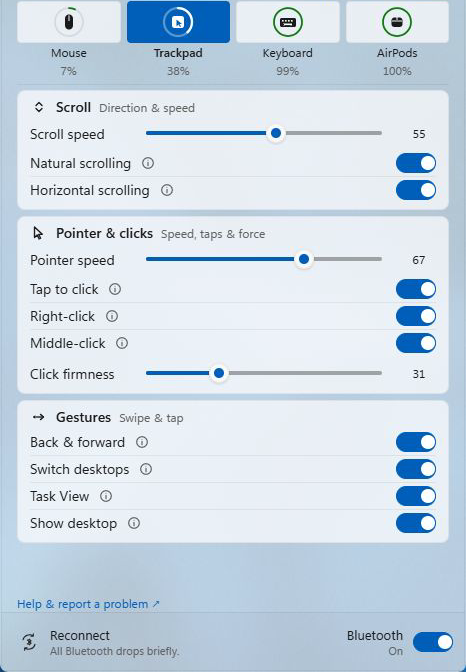
One installer brings scrolling, built-in gestures, keyboard controls and supported AirPods battery reporting to your PC. Check your device model before installing.
Download Tenon and try its Pro features with your supported devices. Magic-device battery and connection status stay free after the trial. See Pro plans.
Tenon reads the multi-touch data directly from the hardware and turns it into native Windows input.
Pixel-level scrolling for the Magic Mouse and Trackpad, instead of the line-by-line jumps Windows gives you by default.
One-, two-, and three-finger swipes, tap-to-click, and force-click, mapped to native Windows actions.
The driver is code-signed and Microsoft-attested, so it installs like any normal driver. You don't have to disable Secure Boot or driver-signature enforcement.
What Tenon does for each device, and the setup guides if you want the manual routes.
Smooth scrolling, surface swipes, and battery status, over Bluetooth.
Gestures on the USB-C model from Tenon’s own engine rather than Windows Precision Touchpad, over Bluetooth or USB.
Media and function keys, plus Command/Control remapping on supported Magic Keyboard models—including the Lightning A2450.
See your AirPods battery levels alongside your Magic devices. Included with Pro and the 30-day trial.
Check AirPods support →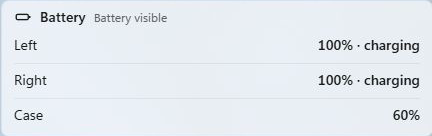
Tenon Pro is $50 a year for your mouse, trackpad, keyboard, and AirPods together. There are no per-device licenses. How that compares to Magic Utilities →
$0
Battery and connection status for all three devices.
$50/yr
Everything Tenon does.
One signed installer carries the app, the background service and the supported Apple-device drivers. Pro starts with a 30-day trial in the app, with no card or account required.